Sunday, January 27, 2019

Developing skills and experimenting with tools


After further research around good info graphics and checking out the links(list can be found in previous blog), I have used my current knowledge and know how to create this.


As shown in the video, I changed the background to make it more interesting during the documentary I found that video full of color transitioning into a white background info graphic doesn't look that appealing at all so while experimenting and understanding powerpoint more, I found a way to change to change the background of the infographic and evidently looks more interesting than a white background.

To make the infographic more interesting, I added some outline of images to make the presentation more unique such as having an outline of a plastic bottle which says plastic bottle and an outline of a fish which says marine litter, all of this is done to make the presentation stand out more than it should and my previous works as back then I never had the time to experiment enough to reach this stage.

Overall, the video wasn't as good as I expected, I should try out different and more complex transitions such as turning chunks of text at a certain angle and continue the animation just like the Kinetic Typography video. Either way, my director said that I should keep making more infographics as practice to familiarize myself with powepoint as preparation for my final product.

Develop an understanding of Information Graphics


PresentationLoad PowerPoint Templates - Animated Charts Collection - YouTube
A great collection of examples to open your eyes up to what can be done in Powerpoint
Presentation Process - YouTube
A really good set of examples and how to's on some interesting presentation effects using Powerpoint
Explaindio Kinetic Typography Sample - YouTube
This sort of animated text or "Kinetic Typography" could form part of how some information was presented.
Animated Org Chart PowerPoint Template - YouTube
This video shows how simple animation through Powerpoint can make the presentation of an organisational type chart have more impact and visual interest.

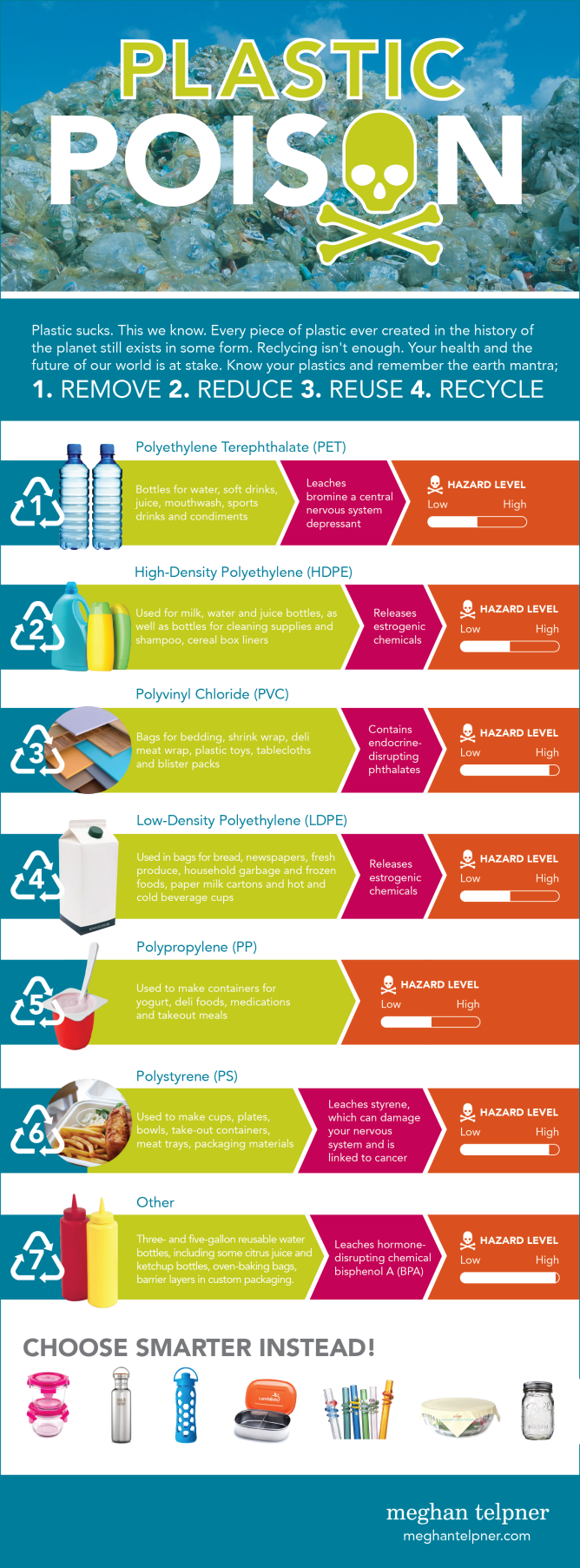
Plastic Toxicity Infographic

The links above are videos around animation on power point that could help me develop appealing animations for the final documentary.

The link at the very top(Presentation Load PowerPoint Templates) was very interesting because it puts complex and appealing text manipulation into simple steps which proved there was more to powerpoint than i imagined, anyway because of this link I came up with some ideas I could use in the future such as the "zoom effect" which I can use to highlight important statistics

In the info graphic shown above, the is information around my group's topic of plastic packaging. For example, I learned that most food packaging was made out of polypropylene as well as the fact that it is somewhat toxic to marine life, though this isn't a good example of what I'm supposed to achieve for the final outcome, I could put information like this together in video format so it fits in well with the documentary.


Example of good infographics

The link above is a video about the waste that could be found in a takeaway box. This is a prime example of what the final documentary might look like and what my statistics should look like as well, eye catching and detailed. Also, the statistics were colorful which made the video much more interesting so minor aspects that come in while making these info graphic videos such as the text font makes a big difference to the audience. I think what made the video even better was the fact that the statistics were quick and fast, I only had to read some numbers over the narration which is better as if I just read the text, it would have been pretty boring so from now one of my main goals is to make a video that can please the audience.

Sunday, January 6, 2019

IEA 2018-2019 (Roles and Responsibilities)

Introduction

This year, I am taking on the role as information design as my laptop is not strong enough to process the editing software required for the editor but also to improve on what I started in year 9 as in my opinion, I didn't do as well as I thought I would so this year I'm hoping to do better for not only myself but for the team too. Because of the past two years of working with my laptop, I feel that I have naturally improved in my skills in creating infographic videos which will help me produce the very best for the final outcome for my last year for the IEA award.

Roles and Responsibilities


As an Information designer, I have the responsibility of providing information and research to the director which is deemed useful for our final outcome and documentary. What I'm collecting and vary from Statistical charts to history timelines but another important role of a information designer is to recreate our information into a form which is appealing to general audiences that we can use for our final documentary.  


Goals & Objectives

Goals

  • Improve in creating info graphics
  • Support the group with research
  • Try out different skills on whatever platform I'm using(such as powerpoint)

Objectives

  • Watch more tutorial videos on powerpoint animation
  • make at least 4 animations for the video