Saturday, April 6, 2019

Evaluation

Evaluation

After successfully creating 2 high quality infographics(technically 3 as one of the infographics is split into 2 parts), I found that my product has exceeded and somewhat diverged from my objectives set before the production process for my infographics but luckily everything that has happened ended up positively benefiting my final outcome. The list below shows the aims and objectives I set myself and also what I attempted to revolve my work around.

Aims

  • Make multiple high quality infographics
  • Be proficient in terms of producing infographics
  • The audience will experience the presentation of statistics in a much more entertaining way
  • Set a balance color scheme and use this color scheme to create the infographic
  • Make Quick, detailed infographics

Objectives

  • Make more than 1 high quality infographic
  • Make an infographic using one animation effect to create simplicity
  • Have the audience's attention throughout the infographic
  • Only use the colors: Black(for background), White and Red
  • each infographic in video form must only take around 5 seconds from start to finish 
I exceeded my objectives was when I set the aim of "Be proficient in terms of producing infographics" and the objective of "Make an infographic using one animation effect to create simplicity", I thought I excelled in this aspect as I ended up using one animation effect as well as researching and learning about when most of the animation effects are best used and could be seen at its best and also learned how to add minor but significant details such as changing the smoothness at the start of the animation, smoothness at the end of the animation which is great for transitioning.

Although my work was yet smooth, detailed and simplistic. I failed to meet one of my objectives which was to follow a strict color scheme of only using the colors black, white and red, I ended up using 5 different colors being blue, green, white, black and red. This was because while deciding on which transition to use, I found that transitions don't work on a black background which forced me to conduct the change of colors but all did end well as the infographic still kept its high quality with some colors contrasting each other making the video look really sharp. In future, I would know that if I were to use transition for my infographic, I would not use black for my background or even use a different software to create my infographics and maybe research more skills I can use to create professional looking infographics on powerpoint.

Overall, my collaboration and communications have developed a lot since last year. I felt that I worked the most efficient this year as because I felt more confident when working with my teammates maybe reason being that I have matured and grew older which lead myself to take initiative to speak up more often and also to help my teammates more even as a information designer. Also, for preparations I spent a lot of time communicating with my teammates and director in order to create the best and most suitable inforgraphic for the video because I had to make infographics according to the script and how my editor liked it which was fair as he was the one editing the final documentary. In my opinion, if I were to take part in similar project to this I would take on the leadership role as I feel like I have built enough confidence to collaborate with strangers I've never met. 

Final Documentary

The link above is the final documentary.


Originality and Creativity

Production for info graphic on Power Point


 I feel that there is a big gap in terms of quality when comparing my product for year 11 and year 9 with the product made this year(year 11) being a lot better, this is because I have done more research on ways to make my product better and used simple tutorials to teach me certain tricks I can use on Power Point.

What I used to aid my infographics

The link above is what I used to aid my production process. Here I have learned the impact of color contrast and also how to use the animations probably as I realized in year 9 all I did was insert random animations without considering balance, timing and an exiting transition which I did this year. Overall I am really proud of my work this year and below is the development of my product from start to finish.

To start my product, I had to consider two things: how much space does the statistic take up and can I make the statistic simpler, these two aspects are important as this will differ the spacing/formatting of the info graphic and the size of text. I used the statistic "95% of the value of plastic packaging is estimated to be lost after being used once , Hong Kong ends up losing around US$120billion (HK$940 billion) each year", changed around some of the words and got "Hong Kong loses $940 billion each year because 95% of plastic is single use". Even though the statistic is still long in length, I split the sentence in half and decided to work on two combined info graphic instead of one single animation, all I had to do after that was to manipulate the text and add animation to it.


To start off, I decided to format out the text like this and the reason behind it is because the "HKD $940 billion" statistic is very important part of this sentence, this is what grabs the audience's attention when they read the statistic as people are attracted to numbers, especially big numbers. Because of this I decided to add emphasis to the text and by doing so the audience's attention is directed at the text which have been emphasized, I added emphasis to "HKD $940 billion" by highlighting the text and changing the color of the text to a different color making it stand out more. I also added emphasis to "Hong Kong" and "Each Year" because these words makes the data more specific, we know what this statistic effect and the extent of its effect because of these words. Though they aren't as impacting, they still hold some significance so I decided to just change the text color. 


After completing the first part of the infographic, I then created this which is the second part/next half of the statistic. here I have done a similar thing to the previous infographic expect this time I formatted things differently and emphasized more significant data differently as well. In the case, I emphasized "95%" and "single use" reason being 95% is obviously a very high percentage and that can easily attract the audience's attention, but I emphasized "single use" due to my group's research question surrounding plastic food packaging and since a lot of plastic food packaging is known to be single use I thought it would be great if I were emphasize "single use" to refer back to the research question.


The image above is the process of me adding animation to my infographic, bringing it to life and making it more eye catching and entertaining. I did this process with both parts of the infographic but I'll use the first part as an example as both infographics are made in the exact same fashion which I am going to explain right now.

Firstly, I obviously had to choose an animation to apply to each text. I ended up applying the same animation for the entire infographic because this way the infographic won't look as chaotic and over complicated which was a lesson I learned from 2 years ago and as you can see in the video, by doing this it does heighten the quality of the infographic to a certain extent. To top it all off, I added exiting animations to aid the transition from the infographic back to the main video.

In power point, if I were to add an animation for every separated text, in order to activate the animations, I would have to constantly press my spacebar or click to run each animation as this is what it is made to do. My solution to this problem was to change some of the animation settings. To start off, the first animation that starts at the very beginning would be set to start "on click" as technically being presented and having the slides start counts as a click. Every other animation that follows after will be set to start "After previous" causing every animation to happen right after the other in a domino effect like fashion. For the exiting animations, it would be time consuming if each animation were to slowly transition out of the screen so to prevent this from happening, I set the animations to start "with previous" from the first exiting animation after the last main animation which causes every animation which has been set to start "with previous" to "exit" at the same time.

Though everything seems to be done, I still need to think of a way to combine the two parts together as these two parts are part of one long statistic. I used a transition to combine the two parts together as transitions are basically animations in between slides which was perfect for what I needed(the transition I used was what happened straight after the first infographic), not only did I do this for aesthetics but also to keep the audience's attention on the infographic and in a way more satisfying to watch as it would be wrong if the first part ended and the transition was a pause and a black screen for a few seconds.


Tuesday, March 19, 2019

Aims and Objectives for Info-graphic


Aims and Objectives

With the meeting coming to an end, my director set me the task to think of some aims and objectives to help me create my info-graphic, thinking of my aims and objectives are the foundation for my ideas of how to format my info graphic. Anything else I want to add can be built off from there.

Aims

  • Make multiple high quality infographics
  • Be proficient in terms of producing infographics
  • The audience will experience the presentation of statistics in a much more entertaining way
  • Set a balance color scheme and use this color scheme to create the infographic
  • Make Quick, detailed infographics

Objectives

  • Make more than 1 high quality infographic
  • Make an infographic using one animation effect to create simplicity
  • Have the audience's attention throughout the infographic
  • Only use the colors: Black(for background), White and Red
  • each infographic in video form must only take around 5 seconds from start to finish 

Sunday, March 3, 2019

Confirming Outcomes/Planning and Research

Prior to the meeting surrounding the decision of deciding on what types of statistics and animation styles. Me and the Director have collected each a certain amount of information surrounding our topic and we decided to pick out some statistics from what we found to use for the few animations which will be used for the final outcome. The statistics that we found are shown below.

  • The top five items were plastic tableware such as straws and cutlery, plastic bags,
  • plastic bottles, food packaging and polystyrene fragments, according to Greenpeace East Asia.
  • Plastic makes up about 20 percent of the Hong Kong daily municipal waste.
  • About 154 tonnes of disposable plastic tableware – 9 per cent of plastic waste and 2 per cent
  • of all municipal waste – went into the city’s overflowing landfills in 2016.
  • Hong Kong’s municipal waste generation has increased 80 per cent over the past 30 years.
  • Cafe de Coral, Fairwood and Maxim’s use 180 million pieces of disposable plastic a year
  • in Hong Kong, Greenpeace study finds
  • Hong Kong buries 2,100 tonnes of its landfill daily with plastic waste, most of the plastic waste consisted
  • of plastic packaging
  • 95% of the value of plastic packaging is estimated to be lost after being used once, Hong Kong ends
  • up losing around US$120 billion (HK$940 billion) each year
  • Less than 15% of plastic waste is recycled in Hong Kong


Overall, after discussing for a while ,we chose the data which is highlighted above because we think that they are the easiest to rephrase into shorter and more detailed sentences and also these pieces of data has statistics as in numbers such as 80% and 30 years. Me and my director has agreed on me using power point to create to the info graphic because me and him know that I have experience in using power-point and he thinks I should use a software in which I'm comfortable with and used to using.

Sunday, February 17, 2019

Planning and Research


Activity 1 - What are some of the key features
that make it effective?
Video 1

  • Big text
  • Color
  • Smooth transition
  • Minimal words
  • Statistics
  • Diagrams
  • Quick animation
Video 2

  • No text
  • Music
  • Smooth animation
  • Transition of time
  • Movement and symbols
  • of the animation
Video 3

  • No text
  • Music
  • Smooth animation
  • Transition of time
  • Movfsement and symbols of the animation
Activity 2 - Select three of the ‘useful resources’
and explain how you will use them to
present your research.
Useful resource 1

Use this to magnify important aspects
of the infographic,
critical information. This can be also
used to magnify a certain area of an
image, showing its significance
compared to the rest of the image
Useful resource 2

Design infographic similar to the
link and it is eye
catching and appealing,
audience learns while being
entertained and the video might
only last around 10 seconds
so the audience doesn’t get bored
Useful resource 3

Express data and statistics through
charts found in the link above
and maybe annotate statistics
and back it up with narration
Activity 3 - Key points for using powerpoint

Storyboard for powerpoint


Firstly create a blank page on powerpoint,
create animation for infographic
such as a building or a bridge or you can search up an image
and copy & paste it onto powerpoint,
add minor details such as color or changing the size of the image
Edit the finished product with animations and make sure each animation
is quick or else the video would be longer than necessary
(video should only take less 10 seconds to finish)
Add any annotations as text which can be finished with animations


Information on Plastic food packaging

https://www.hongkongfp.com/2018/04/21/solving-plastic-packaging-problem-time-industries-governments-play-part/

According to the link above,
  • Hong Kong buries 2,100 tonnes of its landfill daily with plastic waste, most of the plastic waste consisted of plastic packaging
  • 95% of the value of plastic packaging is estimated to be lost after being used once, Hong Kong ends up losing around US$120 billion (HK$940 billion) each year
  • Less than 15% of plastic waste is recycled in Hong Kong

Sunday, January 27, 2019

Developing skills and experimenting with tools


After further research around good info graphics and checking out the links(list can be found in previous blog), I have used my current knowledge and know how to create this.


As shown in the video, I changed the background to make it more interesting during the documentary I found that video full of color transitioning into a white background info graphic doesn't look that appealing at all so while experimenting and understanding powerpoint more, I found a way to change to change the background of the infographic and evidently looks more interesting than a white background.

To make the infographic more interesting, I added some outline of images to make the presentation more unique such as having an outline of a plastic bottle which says plastic bottle and an outline of a fish which says marine litter, all of this is done to make the presentation stand out more than it should and my previous works as back then I never had the time to experiment enough to reach this stage.

Overall, the video wasn't as good as I expected, I should try out different and more complex transitions such as turning chunks of text at a certain angle and continue the animation just like the Kinetic Typography video. Either way, my director said that I should keep making more infographics as practice to familiarize myself with powepoint as preparation for my final product.


Develop an understanding of Information Graphics


PresentationLoad PowerPoint Templates - Animated Charts Collection - YouTube
A great collection of examples to open your eyes up to what can be done in Powerpoint
Presentation Process - YouTube
A really good set of examples and how to's on some interesting presentation effects using Powerpoint
Explaindio Kinetic Typography Sample - YouTube
This sort of animated text or "Kinetic Typography" could form part of how some information was presented.
Animated Org Chart PowerPoint Template - YouTube
This video shows how simple animation through Powerpoint can make the presentation of an organisational type chart have more impact and visual interest.

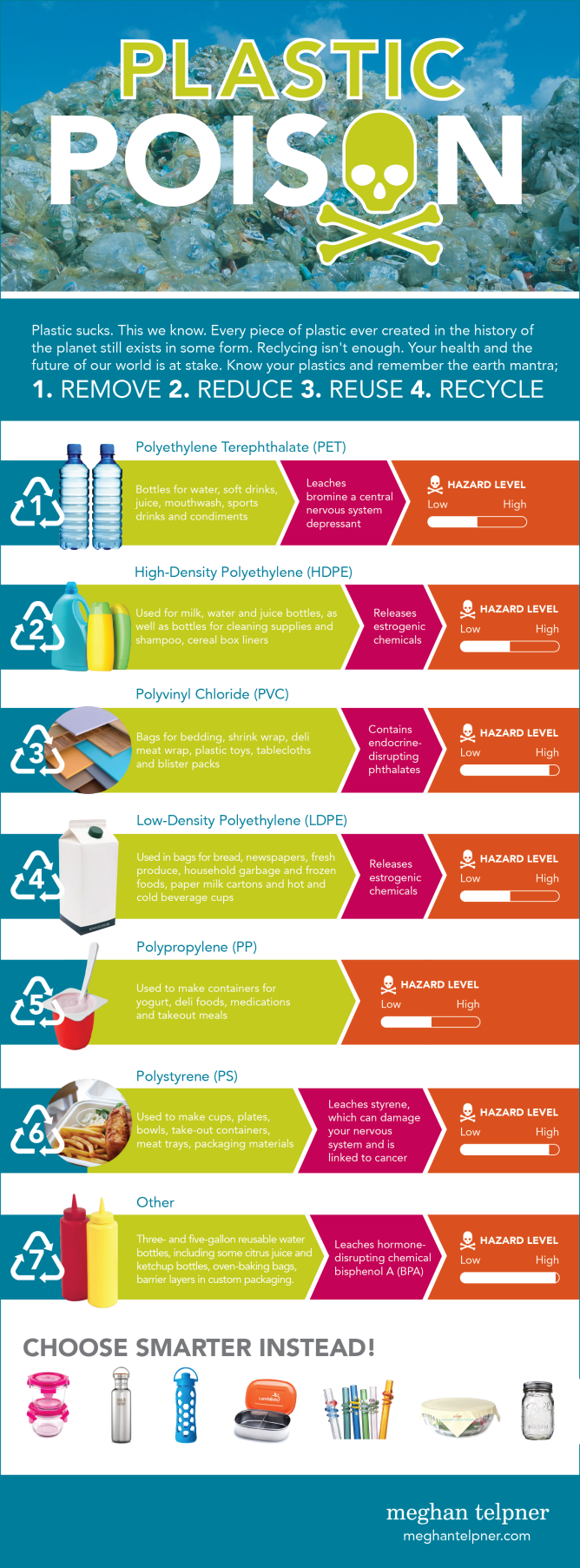
Plastic Toxicity Infographic

The links above are videos around animation on power point that could help me develop appealing animations for the final documentary.

The link at the very top(Presentation Load PowerPoint Templates) was very interesting because it puts complex and appealing text manipulation into simple steps which proved there was more to powerpoint than i imagined, anyway because of this link I came up with some ideas I could use in the future such as the "zoom effect" which I can use to highlight important statistics

In the info graphic shown above, the is information around my group's topic of plastic packaging. For example, I learned that most food packaging was made out of polypropylene as well as the fact that it is somewhat toxic to marine life, though this isn't a good example of what I'm supposed to achieve for the final outcome, I could put information like this together in video format so it fits in well with the documentary.


Example of good infographics

The link above is a video about the waste that could be found in a takeaway box. This is a prime example of what the final documentary might look like and what my statistics should look like as well, eye catching and detailed. Also, the statistics were colorful which made the video much more interesting so minor aspects that come in while making these info graphic videos such as the text font makes a big difference to the audience. I think what made the video even better was the fact that the statistics were quick and fast, I only had to read some numbers over the narration which is better as if I just read the text, it would have been pretty boring so from now one of my main goals is to make a video that can please the audience.